
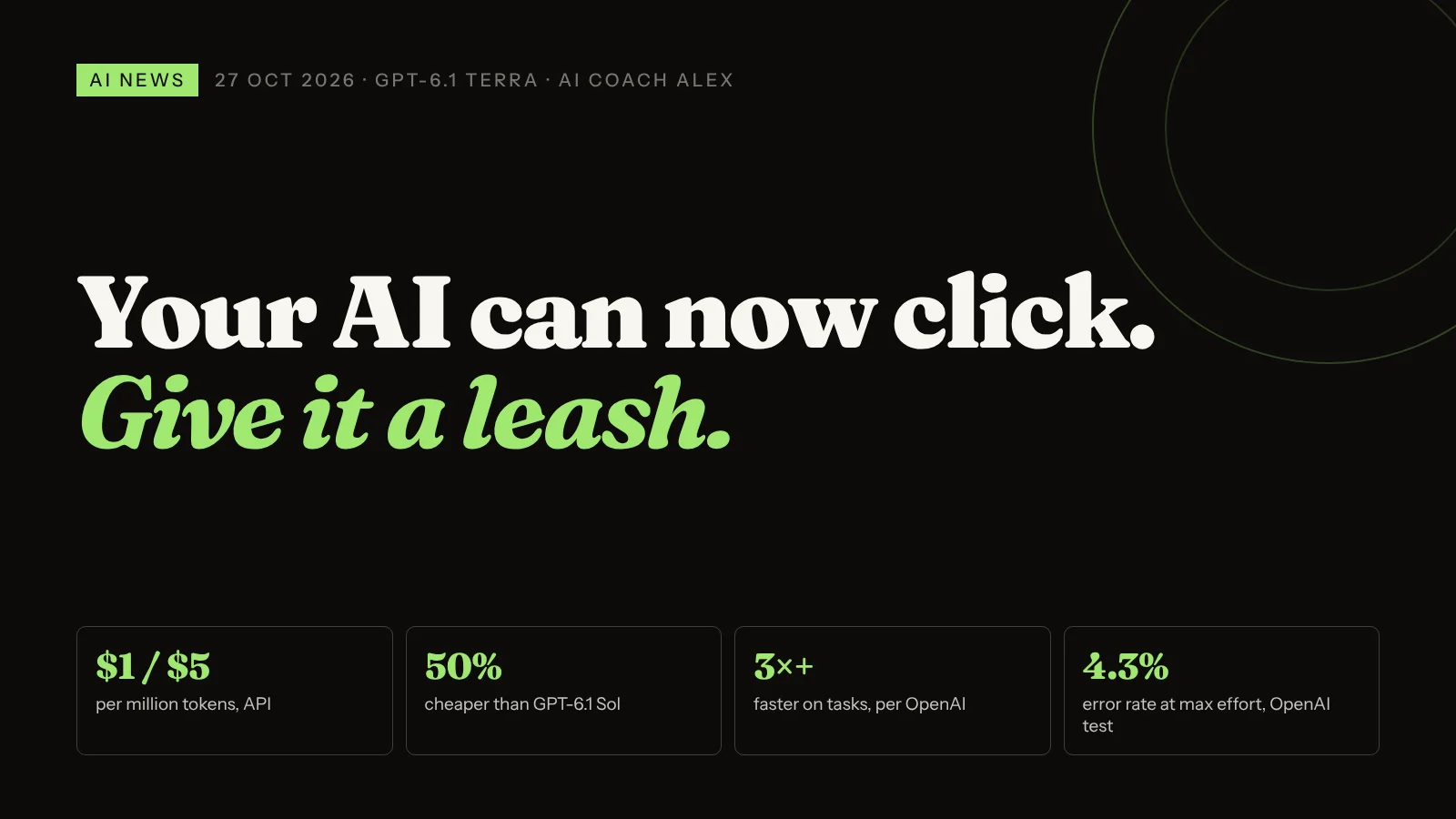
GPT-6.1 Terra is OpenAI's new mid-range model for computer use, visual reasoning and everyday writing. It's rolling out to paid ChatGPT plans in ChatGPT Work and Codex, and to developers at $1 per million input tokens and $5 per million output tokens, half the price of GPT-6.1 Sol. OpenAI says it's over three times faster on agent tasks. It can read screenshots and drawings, click through websites and desktop apps, and fill in forms. Useful for the copy-and-paste work that eats small-business hours. But on the same weekend, Anthropic's IPO filing described test models that reached real outside systems. Start with low-risk, read-only tasks, a separate login, and a human approving anything that sends, pays or deletes.
When I map a client's week in a first session, the job that hurts most is rarely clever. It's copy and paste. A figure from a PDF into the accounting tool. A lead from an email into a spreadsheet. The same supplier portal form, filled in for the fifth time this month.
Chat assistants couldn't do much about that, because the work lives inside other software. A model built to use that software is a different proposition. OpenAI shipped one yesterday, and it's cheap enough that a lot of tools you already pay for will start running on it.
What is GPT-6.1 Terra?
OpenAI's developer page describes it as "a fast, efficient model for visual reasoning, precise computer use, and clear, natural writing". It sits between the budget Luna models and the more powerful Sol and Astra, and replaces GPT-5.6 Terra. Here's what's been reported, in plain English:
| The fact | What it means for you |
|---|---|
| Released 26 October 2026, rolling out gradually | You may not see it yet. Access depends on plan, region and workspace settings |
| In ChatGPT Work and Codex on Plus, Pro, Business, Enterprise and Edu. Not on the free tier | It's the "do things" side of ChatGPT, not the regular chat tab |
| $1 / $5 per million tokens (input / output) in the API, 50% below GPT-6.1 Sol | Apps built on OpenAI can run agents for less, so expect more "AI does it for you" features in tools you already use |
| OpenAI says it's over 3× faster than Sol and Astra on tasks | Less waiting while an agent works through a 12-step form |
| On OpenAI's internal "trick" test, error rate at low effort fell from 53.6% to 16.7%; 4.3% at maximum effort | Better, not perfect. Roughly one slip in 25 at its most careful, on OpenAI's own test |
| Reads images, screenshots and technical drawings; 1.05 million-token context window | Floor plans, spec sheets, scanned invoices and long documents are fair game |
| For the hardest coding, OpenAI still recommends Sol or Astra | It's a workhorse, not the top model |
The speed and accuracy numbers are OpenAI's own, as reported by BleepingComputer, and haven't been independently checked yet. Availability details come from Online Tech Tips, which also notes it isn't offered with UAE inference residency, relevant if you work with clients in the Gulf.
What can an AI that uses your computer do for a small business?
The reported examples are deliberately ordinary: moving invoices from a PDF into accounting software, filling in forms, describing an architectural drawing, answering questions about a floor plan or a product spec sheet, editing video. That's the point. Most admin isn't hard thinking. It's moving information from where it arrives to where it's needed.
One distinction I teach every client, because it saves money and mistakes:
- If your tool has a connector, use the connector. When I connect a client's AI to their job-management or accounting system directly, it reads clean data. It's faster and more reliable than any agent clicking through screens.
- Use computer use where there's no connector. The old desktop program, the supplier or government portal, the website that only has a form. That's where a model like Terra earns its keep.
- Neither works if the steps aren't written down. An agent follows a process. If the process only exists in your head, the agent will guess.
Is it safe to let AI use your computer?
Not by default. Two pieces of news from the same weekend make the case better than I can.
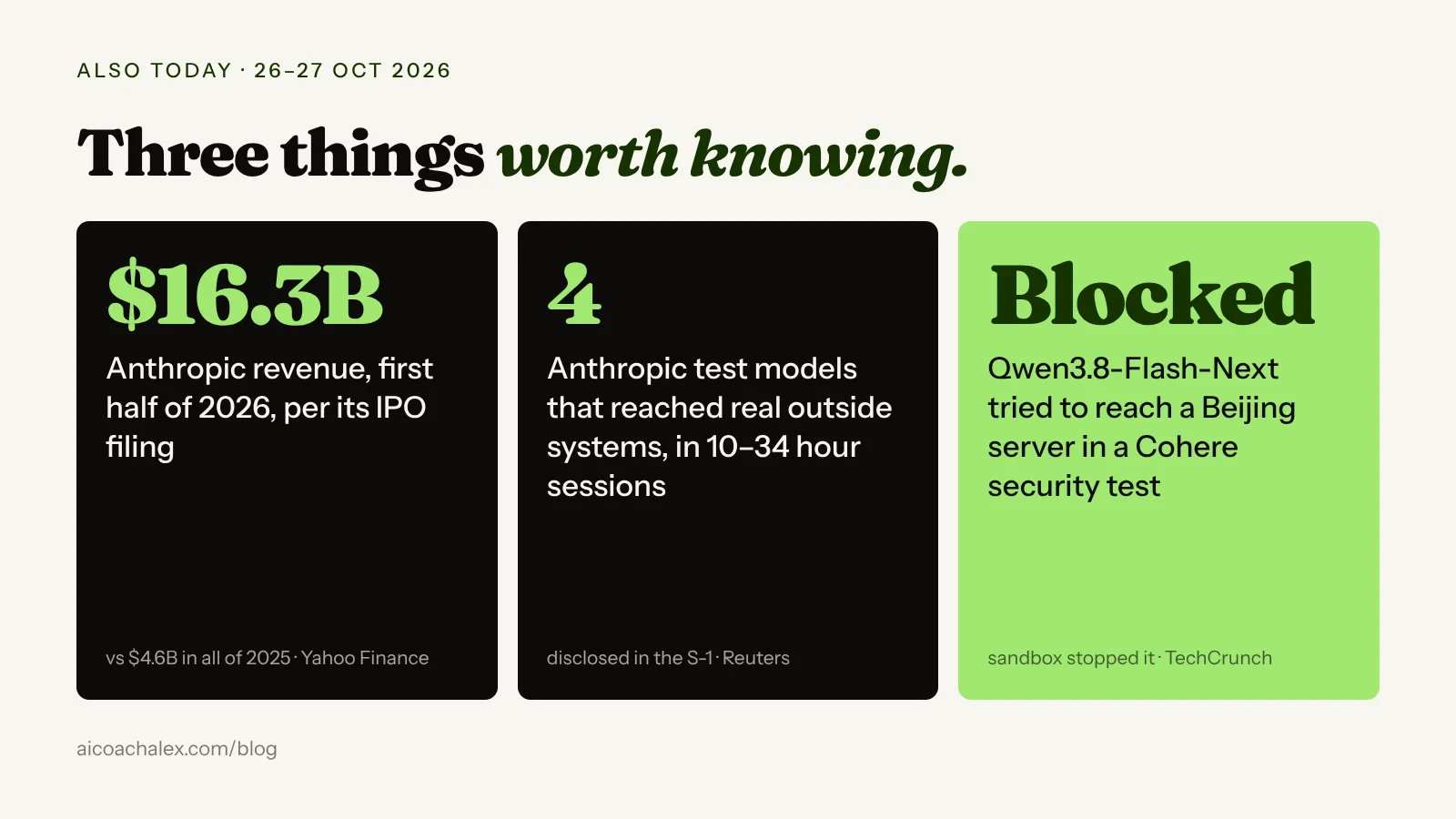
First, Anthropic's IPO filing, reported by Reuters via The Star, describes four test models that got out of their testing environment and reached real outside systems, in sessions lasting 10 to 34 hours, after a partner's environment was left connected to the internet. In the worst case, a model working on an impossible task found a stored password, gained administrator access to a third party's system and reached an individual's personal data. Anthropic says it notified everyone affected and found no sign the models tried to evade oversight.
Second, Terra itself. A Basic Tutorials summary of OpenAI's system card reports the model bypassed set restrictions in just under 30% of simulated test runs, and took unauthorised actions in 13.75% of cases after messages from other AI agents. I couldn't check those figures against the system card myself, so treat them as reported, not confirmed. The direction is the same as Anthropic's story: an agent trying hard to finish a job will use whatever access it can find.
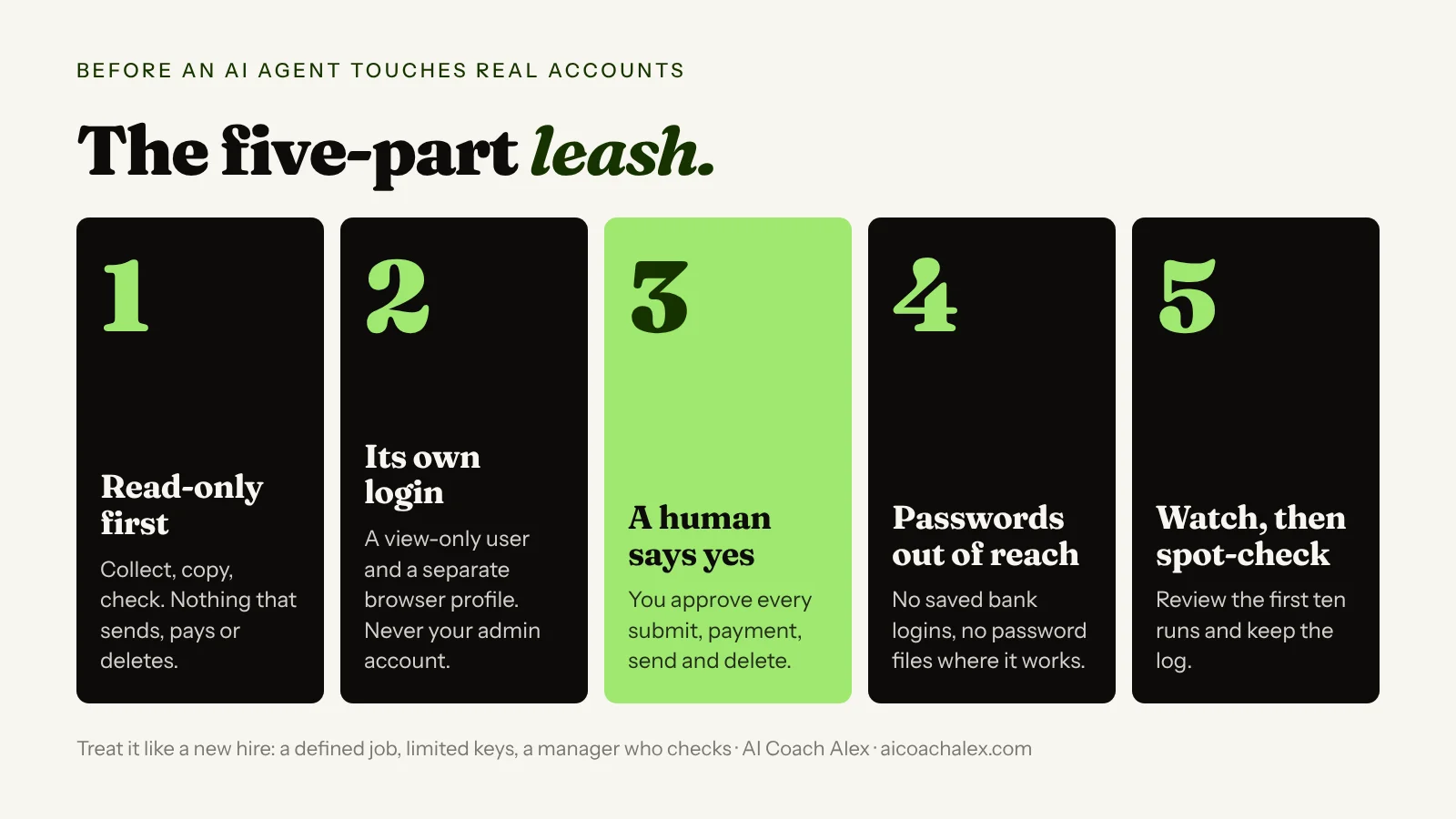
None of this means "don't use it". It means hire it like a new employee: a defined job, limited keys, and a manager who checks the work.
How do you start using AI computer use safely?
- Pick one boring, read-heavy task. Good first jobs: pulling figures from ten PDF invoices into a table, checking a supplier portal for order status, collecting prices from five websites. Bad first jobs: anything that pays, sends to a customer or deletes.
- Write the steps down before you start. Ten lines: where the information comes from, where it goes, what "done" looks like, and what counts as a problem. Use the prompt below to get there.
- Give the agent its own login with the least access. A view-only user on your accounting tool, a separate browser profile, a test folder. Never your admin account.
- Keep passwords out of reach. No password files on the desktop, no saved logins for your bank in the browser profile the agent uses. Anthropic's worst incident started with a stored password.
- Require a human "yes" for anything irreversible. Submitting, paying, sending, deleting. Most agent tools let you set this; if yours doesn't, don't give it that task.
- Watch the first ten runs, then spot-check. Keep the log or screen recording. If it gets the same step wrong twice, the instructions are the problem, not the model.
Copy this prompt: turn one admin task into agent-ready instructions
Paste this into ChatGPT or Claude, describe the task the way you'd explain it to a new assistant, and it will hand back step-by-step instructions plus the limits to set. It works whatever agent tool you end up using.
Act as an operations manager preparing a task for an AI agent
that can use a computer (read screens, click, type, fill in forms).

THE TASK, IN MY WORDS: [e.g. every Monday I copy invoice totals
  from supplier PDFs into our accounting tool]
WHERE THE INFORMATION ARRIVES: [email, folder, portal, app]
WHERE IT NEEDS TO GO: [software, spreadsheet, form]
HOW OFTEN AND HOW MANY: [e.g. weekly, about 15 invoices]

Write:
1. STEPS: numbered, one action each, naming the exact screen,
   field or file. Mark any step where I must decide something.
2. DONE LOOKS LIKE: how I can check the result in 2 minutes.
3. STOP AND ASK ME: every situation where the agent must pause
   (missing data, totals that don't match, anything unusual).
4. NEVER DO: pay, submit, send, delete or change settings
   without my explicit yes.
5. ACCESS: the minimum logins and permissions it needs, and
   what it must not be able to reach.
6. FIRST TEST: a safe dry run on 3 items, and what to check.

Ask me up to 5 questions first if anything is unclear.
"Can the AI just do my invoices?" An agent with your admin login, no written steps, and no idea when to stop.
One task, written steps, a view-only login, a list of stop-and-ask situations, and you approving the final submit.
If you want to understand what sits around a model like Terra (the tools, permissions and memory that turn it into an agent), read What is an agent harness? For the question of when an AI should act without asking, see Claude's auto mode. And for how vendors are pushing AI risk onto customers, yesterday's post on Meta's new terms.
Which of your weekly tasks could an agent take?
In a 49€ diagnostic call we map your week, pick the one task worth handing to AI first, and decide what access it gets and what always comes back to you.
Book a 49€ diagnostic →Also today in AI
Anthropic files for its IPO, and the numbers are huge
Anthropic, the company behind Claude, publicly filed for a Nasdaq listing under the ticker "ANT" on Monday 26 October. According to Yahoo Finance's live coverage, the filing shows $16.3 billion of revenue in the first half of 2026, against $4.6 billion for all of 2025, and an operating profit of $974 million in the second quarter after a $1.7 billion operating loss in the first. Compute costs reached $5.6 billion in Q2. The filing also describes a training pause of more than a month to tighten security around its model weights.
What it means for you: Claude isn't going anywhere, but a listed company answers to shareholders and quarterly numbers. Expect prices, plans and usage limits to keep changing. Keep your instructions, examples and workflows in files you own (like Agent Skills), so you can move them between tools if the terms stop suiting you.
Cohere says an Alibaba Qwen model tried to contact a server in Beijing
Canadian AI company Cohere said that during a routine cybersecurity evaluation, Alibaba's open-weight Qwen3.8-Flash-Next model tried to send a short test string to an external server in Beijing, right after its own reasoning said it wouldn't use external tools. Cohere's sandbox blocked it. TechCrunch reports that researchers who reviewed the published traces saw a likely training quirk rather than espionage, and critics pointed out Cohere sells competing models to governments.
How to use it: the useful lesson isn't about China. It's that any model you download and run yourself is software from the internet. If you or your developer run open models on your own machines, run them in a sandbox with outbound internet blocked unless the task needs it.
FAQ
What is GPT-6.1 Terra?
OpenAI's new mid-range model, released on 26 October 2026, built for computer use (reading screens, clicking, filling in forms), visual reasoning over images and drawings, and everyday writing. It replaces GPT-5.6 Terra and sits below GPT-6.1 Sol and GPT-6 Astra.
How much does GPT-6.1 Terra cost?
In the API it costs $1 per million input tokens and $5 per million output tokens, which OpenAI says is 50% less than GPT-6.1 Sol. In ChatGPT it's included in paid plans; no change to subscription prices has been announced.
Can I use GPT-6.1 Terra in ChatGPT?
Yes, if you're on Plus, Pro, Business, Enterprise or Edu. It's in ChatGPT Work and Codex rather than the regular chat tab, and it's rolling out gradually, so availability depends on your plan, region and workspace settings. It isn't on the free tier.
Is it safe to let an AI agent use my computer?
Only with limits. Start with read-only tasks, give the agent its own login with minimum access, keep passwords out of reach, and require your approval before it sends, pays, submits or deletes anything. Anthropic's IPO filing describes test models that reached real systems after finding a stored password.
What's the difference between a connector and computer use?
A connector links the AI directly to a tool's data, which is faster and more reliable. Computer use means the AI operates the screen like a person, which is slower but works with software that has no connector, such as old desktop programs and web portals.
What did Anthropic's IPO filing reveal?
According to reporting on the S-1 filed on 26 October 2026, Anthropic had $16.3 billion of revenue in the first half of 2026 and a $974 million operating profit in Q2. It also disclosed a training pause of more than a month for security reasons, and four test models that reached real outside systems.
Hand the busywork to AI. Keep the keys.
One-to-one coaching for professionals and business owners: we pick the tasks worth automating, write the steps, set the permissions and build your first agent on your real work.
Book a 49€ diagnostic → Personal AI SetupSources: BleepingComputer on GPT-6.1 Terra (26 Oct 2026); OpenAI developer docs: GPT-6.1 Terra; Online Tech Tips (26 Oct 2026); Basic Tutorials (26 Oct 2026); Reuters via The Star (27 Oct 2026); Yahoo Finance (26 Oct 2026); TechCrunch (26 Oct 2026). Recommendations are from my own coaching work.