
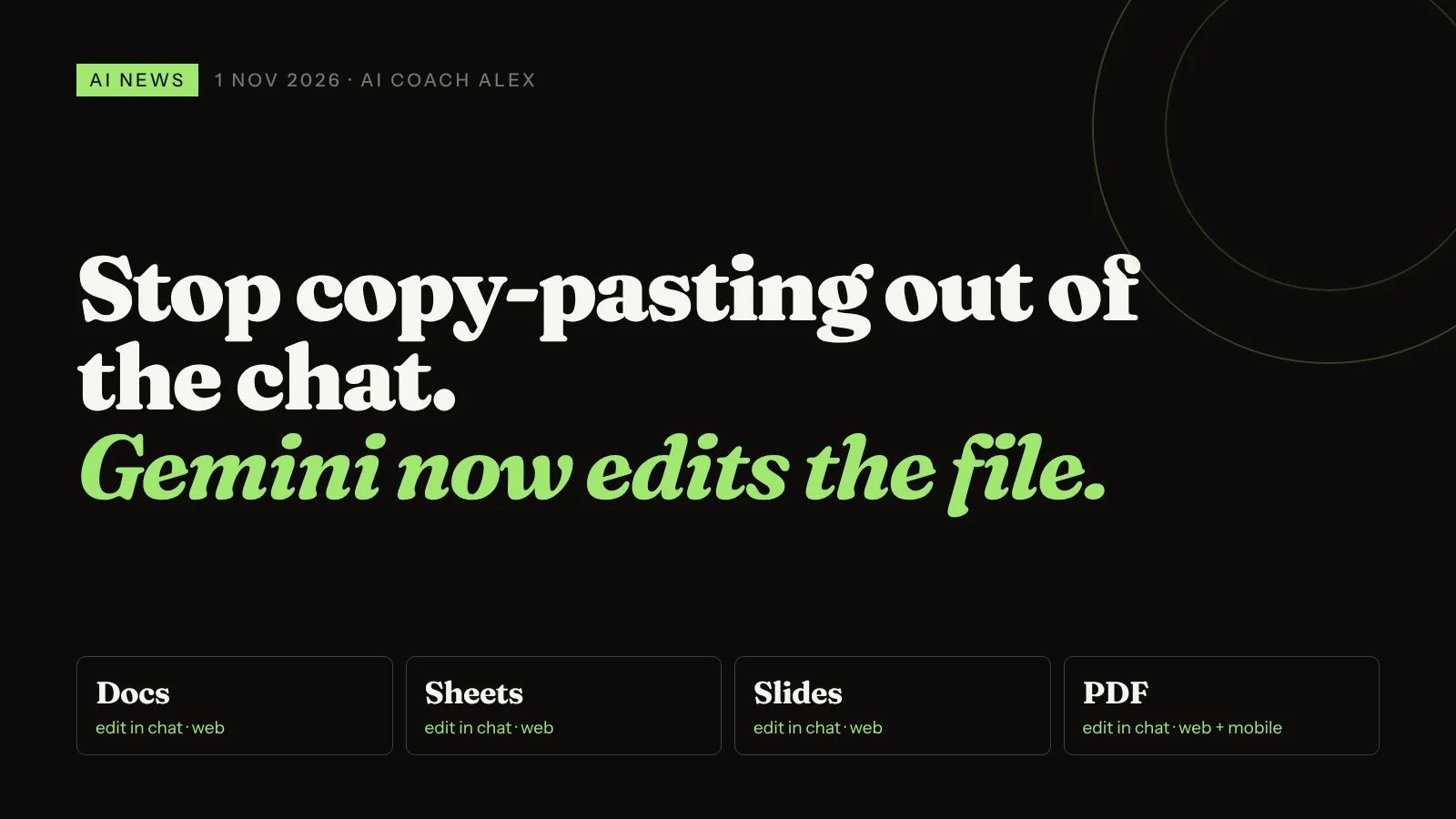
Since 29 October 2026, the Gemini app lets you generate, preview and edit documents, PDFs, presentations, spreadsheets and code files inside the conversation. You open the file full screen, type corrections yourself, or highlight a section and tell Gemini how to change it. It's rolling out to all users in every language where the Gemini app is available. PDF editing works on web and mobile; Docs, Sheets, slides, Markdown, text and code files are web only for now. The practical win: you can take a document from rough notes to "ready to send" without copy-pasting between a chat window and Word.
The most common time-waster I see in lessons isn't a bad prompt. It's what happens after a good one. Someone gets a decent draft from an AI, copies it into Word or Google Docs, spots three things to fix, goes back to the chat, asks again, and pastes the whole thing in once more. Formatting breaks. A paragraph they had already fixed by hand gets overwritten.
That back-and-forth is exactly the step Google just removed from Gemini.
What did Google announce for Gemini on 29 October?
Google updated the Gemini app so you can create, preview and edit documents, PDFs, presentations, spreadsheets and code directly in a conversation. Back in April, Gemini learned to generate files (Google Docs, Sheets, Slides, PDF, Word, Excel, CSV and more) that you could download or send to Drive. What's new is the editing: the file is no longer a finished output you take elsewhere. It's something you keep working on with Gemini.
| What you can do | How it works | Where |
|---|---|---|
| Edit PDFs | Preview and edit the PDF inside the chat | Web and mobile |
| Edit Docs, Sheets, slides | Open full screen and change the content | Web only (for now) |
| Edit Markdown, TXT, code | Same editor, same options | Web only |
| Type your own fixes | Click into the file and edit like a normal document | Full-screen view |
| Highlight and describe | Select a passage or a table, then tell Gemini what to change | Full-screen view |
| Export | Save locally as a PDF or send the file to Google Drive | Export menu at the top |
According to Chrome Unboxed, which tested it, the highlight feature uses a floating "Describe changes" bar: select a summary table, type "show this as a graph instead", and Gemini redraws that part. Google's own example is turning photos of handwritten notes into a PDF study guide, then refining it in the same chat. No paid plan is mentioned: the update is going to all users where the Gemini app is offered.
Why does editing inside the chat matter for professionals?
Because most real work isn't "write me something". It's "write me something, then let me fix the bits only I know are wrong". Until now, chat tools were good at the first half and clumsy at the second.
- You stop losing your own edits. When you fix a number by hand and then ask the AI to rewrite a different section, you're working on the same file, not pasting a fresh version over your corrections.
- Targeted changes beat full rewrites. Highlighting one paragraph and saying "make this firmer" is faster, and less risky, than asking for the whole document again and hoping nothing else moved.
- Phones become useful for PDFs. A freelancer can tweak a quote or a handout PDF from a mobile, between meetings, without a desktop editor.
- It raises the bar for every assistant. ChatGPT and Claude already have their own canvases and file outputs. Gemini's version sits next to Google Drive, which many small businesses already use for everything.
The skill that matters now isn't writing the perfect prompt. It's knowing what to highlight and what to ask for.
How do you edit a file in Gemini, step by step?
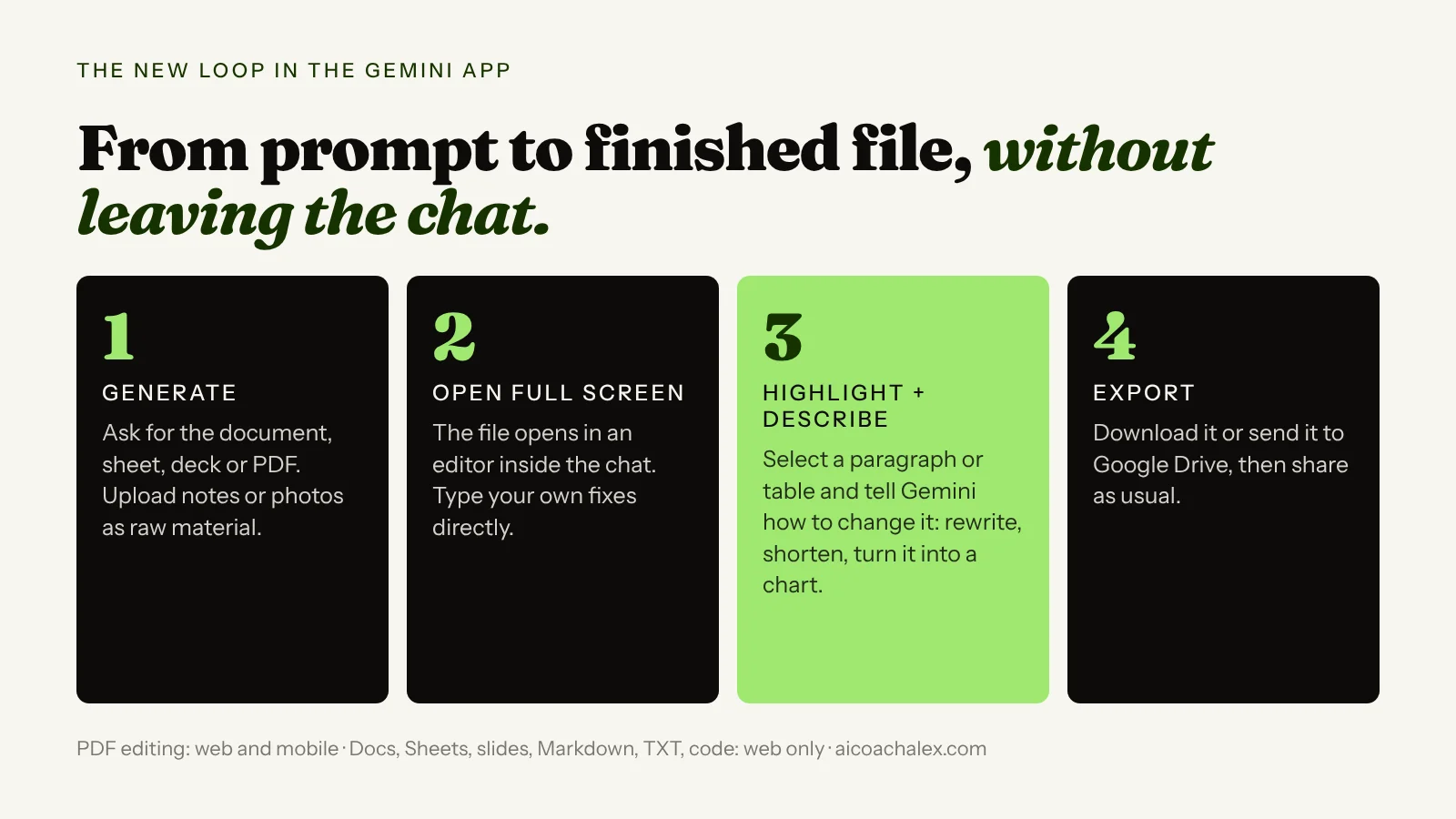
- Start on the web. Go to gemini.google.com on a computer. Docs, Sheets and slides editing is web-only for now; PDFs also work in the mobile app.
- Give it real raw material. Paste your notes, upload a photo of a whiteboard, or drop in last month's version. Ask for a specific file type: "Create a Google Doc", "Create a PDF", "Create a spreadsheet".
- Open the file full screen and fix the facts yourself. Names, prices, dates, client details. These are the things AI gets wrong and you know instantly. Type them in directly.
- Then highlight and ask, one section at a time. "Make this shorter." "Turn this list into a table." "Show this as a chart." Small, specific requests give you control over what changes.
- Read the whole thing once before exporting. Check that numbers you fixed by hand are still right, then export to Drive or as a PDF and send.
- Save your best prompt. If a document type comes up every week (a proposal, a report, a lesson handout), keep the prompt below in a note and reuse it.
Copy this prompt: from messy notes to a client-ready document
Paste this into Gemini on the web, add your notes, then use the highlight-and-describe editor for the final touches.
Create a Google Doc from my notes below.

Document type: [proposal / weekly client report / meeting recap / one-page handout]
Reader: [who will read it and what they care about]
Goal: [what I want the reader to do after reading]
Length: one to two pages maximum.

Structure:
1. A one-paragraph summary at the top
2. Clear headings, short paragraphs
3. Any numbers, prices or dates in a table
4. A "Next steps" section with owners and dates

Rules:
- Use only facts from my notes. If something is missing, write [TO CHECK] instead of guessing.
- Plain, direct language. No buzzwords.
- At the end of the chat (not in the document), list every [TO CHECK] item so I can fix them in the editor.

My notes:
[paste notes here]
Copy the draft into Word, fix three things, go back to the chat, ask again, paste over your own corrections.
Open the file in Gemini, type the facts yourself, highlight one section, say "make this firmer", export to Drive.
Want this set up on your real documents?
In a 49€ diagnostic call we pick the document you rewrite most often and build the prompt and editing routine around it, in Gemini or the AI you already use.
Book a 49€ diagnostic →Also this week in AI
Google's Gemini 4 Carbon arrives, for cyber defenders first
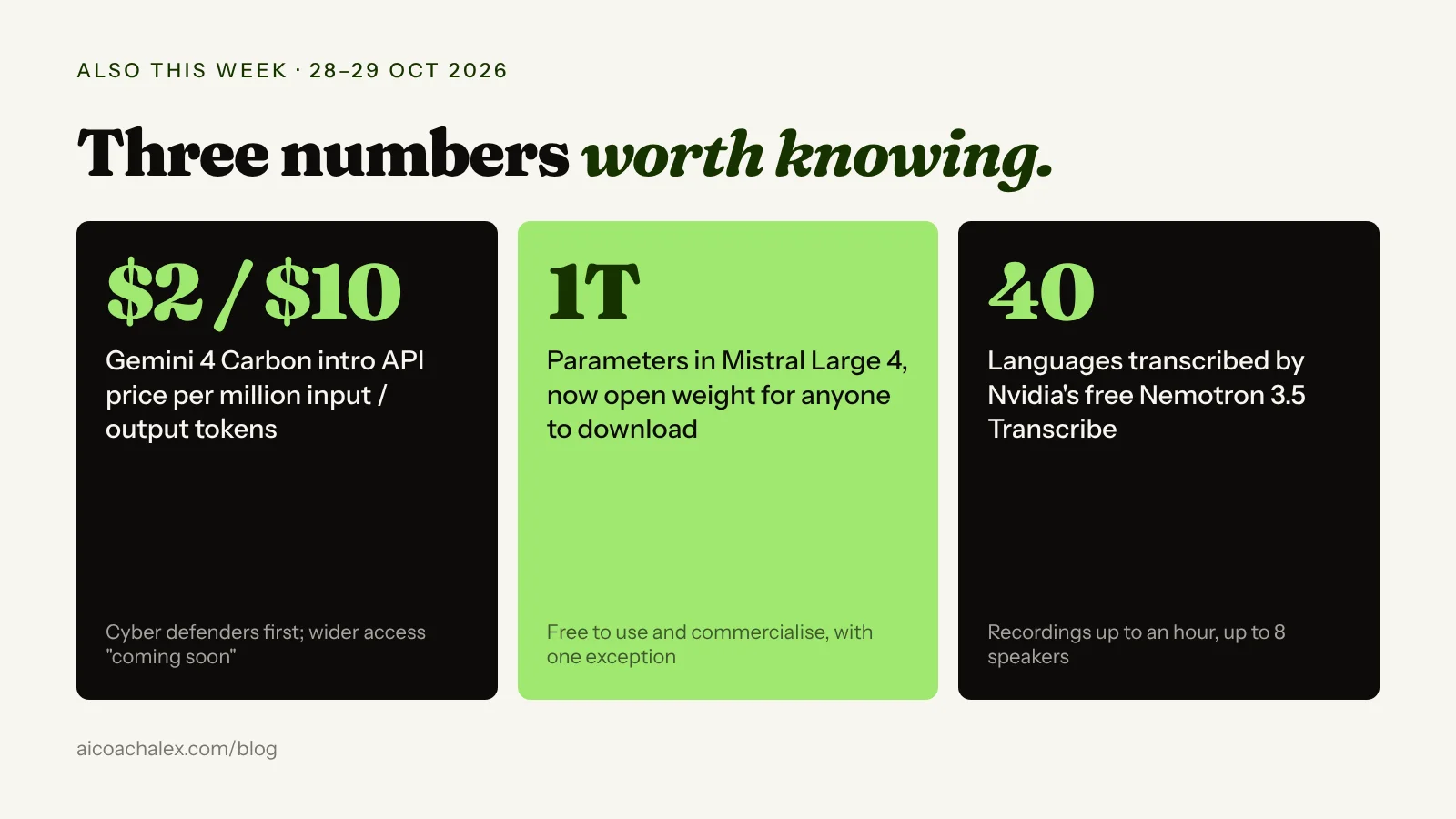
On 28 October Google DeepMind introduced Gemini 4 Carbon, which it calls its strongest model, built for cybersecurity and long, multi-step tasks. It ranks first on Artificial Analysis's new Intelligence Index v5 with a score of 59. Access starts with a group of cyber defenders; developers, businesses and consumers are "coming soon". The introductory API price is $2 per million input tokens and $10 per million output tokens, rising later to $4 and $20.
What it means for you: nothing to switch today. When Carbon reaches the Gemini app, long tasks like "research these ten suppliers and build me a comparison" should get more reliable. Keep your best prompts and skills portable so you can test it the day it lands.
Mistral releases its trillion-parameter model as open weights
French lab Mistral made Mistral Large 4 downloadable on 29 October. It's a one-trillion-parameter model that reads text and images and works in more than 160 languages. The licence lets anyone use, modify and sell products built on it; only companies offering it as a hosted model service need a separate commercial licence. Through Mistral's API it costs $0.70 per million input tokens and $2.10 per million output. TechCrunch notes the pitch is sovereignty: access that can't be switched off.
What it means for you: if your clients ask where their data goes, a European model you can run with a European host is now a serious option, not a compromise. Most freelancers won't self-host a model this size, but your IT provider or software vendor can.
Nvidia gives away a transcription model for 40 languages
Nvidia released Nemotron 3.5 Transcribe on 28 October as a free, open-weight model that allows commercial use. It transcribes 40 languages, translates 31 of them to or from English, labels up to eight speakers and handles recordings up to an hour. It tops Hugging Face's English leaderboard for open speech models with an average word error rate of 5.33%.
How to use it: you won't install it yourself, but expect the meeting-notes and voice-memo apps you already pay for to get cheaper and better at Spanish, Italian and mixed-language calls. When a tool renews, ask which transcription model it uses.
FAQ
Can Gemini edit documents and PDFs directly in the chat?
Yes. Since 29 October 2026 the Gemini app can generate, preview and edit documents, PDFs, presentations, spreadsheets and code inside a conversation. You can type changes yourself in a full-screen view or highlight a section and ask Gemini to change it.
Is Gemini file editing free?
Google is rolling the feature out to all users in every language where the Gemini app is available, and no paid plan has been mentioned as a requirement.
Does Gemini file editing work on mobile?
Partly. PDF preview and editing work on both web and mobile. Editing Google Docs, Sheets, presentations, Markdown, text and code files is web only for now.
Which file types can Gemini create?
Gemini can create Google Docs, Sheets and Slides, PDF, Word (.docx), Excel (.xlsx), CSV, LaTeX, plain text, RTF and Markdown files. For most formats you can download the file or export it to Google Drive.
How is this different from copying text into Google Docs?
You keep working on one file with the AI instead of pasting new versions over your own corrections. You can fix facts by hand and then ask Gemini to change only a highlighted section, so the rest of the document stays as you left it.
What is Gemini 4 Carbon?
Gemini 4 Carbon is a Google DeepMind model announced on 28 October 2026, focused on cybersecurity and long tasks. It is available first to selected cyber defenders, with access for developers, businesses and consumers coming later. Its introductory API price is $2 per million input tokens and $10 per million output tokens.
Get your documents out of the chat and into clients' hands.
One-to-one coaching for professionals and business owners: we set up the AI tools you already have so your proposals, reports and handouts take minutes, not evenings.
Book a 49€ diagnostic → Personal AI SetupSources: Digital Trends (29 Oct 2026); Chrome Unboxed (29 Oct 2026); Unite.AI (29 Oct 2026); Google on generating files in Gemini (29 Apr 2026); Google DeepMind, Introducing Gemini 4 Carbon (28 Oct 2026); Mistral and TechCrunch on Mistral Large 4 (29 Oct 2026); The Next Web on Nemotron 3.5 Transcribe (28 Oct 2026). Recommendations from my own coaching work.